Download and extract Maven.
Add Maven bin directory path to the bashrc file, so you can run Maven from any location.
sudo vi $HOME/.bashrc
Go to the bottom of the file and add the following using a editor such as VI.
export M2_HOME=/usr/local/apache-maven-3.2.3
export PATH=$PATH:$M2_HOME/bin
Make sure JDK path is also set
export JDK_PREFIX=/usr/local/jdk1.7.0_71
export PATH=$PATH:$JDK_PREFIX/bin
Saturday, November 8, 2014

Monday, November 3, 2014
ssh connect to host localhost port 22 connection refused ubuntu
Use the following command
sudo apt-get remove openssh-client openssh-server More details Why am I getting a “port 22: Connection refused” error? Monday, October 27, 2014
Installing Apache Hardtop on Multi Node Fully Distributed Cluster
Create Virtual Machine Template
Build the initial VM by following the my blob post: Installing Apache Hadoop on a Single Node .
Follow the steps in the below Windows Azure article:
How to Capture a Linux Virtual Machine to Use as a Template
Create Five Node Cluster on Windows Azure
Virtual Machine 1 : Name Node and Job Tracker
Virtual Machine 2 : Secondary Name Node
Virtual Machine 3 : Data Node 1
Virtual Machine 4 : Data Node 2
Virtual Machine 5 : Data Node 3
Enable Localhost SSH
ssh-keygen -f "/home/mahesh/.ssh/known_hosts" -R localhost
Change the yellow highlighted text with your user name.
Copy SSH Key to each machine from the Name Node
ssh-copy-id -i $HOME/.ssh/id_rsa.pub mahesh@hd-name2
ssh-copy-id -i $HOME/.ssh/id_rsa.pub mahesh@hd-data1
ssh-copy-id -i $HOME/.ssh/id_rsa.pub mahesh@hd-data2
ssh-copy-id -i $HOME/.ssh/id_rsa.pub mahesh@hd-data3
If you get the error "/usr/bin/ssh-copy-id: ERROR: ssh: Could not resolve hostname hd-name2: Name or service not known". Change host name to the IP.
And if you happened to use the IP, change host namer of "/usr/local/hadoop/conf/core-site.xml" and "/usr/local/hadoop/conf/mapred-site.xml" to IP of the Name Node.
Update "Masters" configuration file with Secondary Name node IP
sudo vi /usr/local//hadoop/conf/masters
Update "Slaves" configuration file with Data node IPs (Each IP should be entered as a new line)
sudo vi /usr/local//hadoop/conf/slaves
Format the name node
hadoop namenode -format
Start Name, Secondary Name Node and Data Nodes
start-dfs.sh

start-mapred.sh

Sunday, October 19, 2014
How to Install Oracle Java7 in Ubuntu Server 14.04 LTS
Add the webupd8team repository
sudo add-apt-repository ppa:webupd8team/java
Get package list
sudo apt-get update
Download and Install the Oracle java 7
sudo apt-get install oracle-java7-installer
Verify the installation
java -version
Or else you can download the JDK from Oracle site. for example " dk-7u71-linux-x64.tar.gz"
Extract it the compressed JDK package
Add JDK bin directory path to the bashrc file, so you can run JDK from any location.
sudo vi $HOME/.bashrc
export JDK_PREFIX=/usr/local/jdk1.7.0_71
export PATH=$PATH:$JDK_PREFIX/bin
sudo add-apt-repository ppa:webupd8team/java
Get package list
sudo apt-get update
Download and Install the Oracle java 7
sudo apt-get install oracle-java7-installer
Verify the installation
java -version
Or else you can download the JDK from Oracle site. for example " dk-7u71-linux-x64.tar.gz"
Extract it the compressed JDK package
Add JDK bin directory path to the bashrc file, so you can run JDK from any location.
sudo vi $HOME/.bashrc
export JDK_PREFIX=/usr/local/jdk1.7.0_71
export PATH=$PATH:$JDK_PREFIX/bin
Saturday, October 18, 2014
Installing Apache Hadoop on a Single Node
There are three modes where you can install Hadoop.
- Standalone - Everything run on one JVM under one single machine.
- Pseudo Distributed - Each run on it's own JVM under one machine.
- Fully Distributed - Each Service run on it's on machine.
I am using the following Ubuntu, JDK and Hadoop versions:
Hadoop version: hadoop-1.2.1
JDK: openjdk-7-jdk
Ubuntu: Server 14.04 LTS
Hadoop version: hadoop-1.2.1
JDK: openjdk-7-jdk
Ubuntu: Server 14.04 LTS
Configuration and Installation Steps for Pseudo Distributed mode
Generate the public/private RSA key, without a password and save the key file with the default name "id_rsa.pub".ssh-keygen
Add the generated key to authorized key list
cat ~/.ssh/id_rsa.pub >> ~/.ssh/authorized_keys
For the Fully Distributed mode this key file needs to be send to each node through the "ssh-copy" to avoid password prompts.
Try SSH connect, it shouldn't ask for password
ssh localhost
Install Open JDK
sudo apt-get install openjdk-7-jdk
Check the java version after the installation is completed
java -version
Download the Hadoop
wget http://apache.mirrors.pair.com/hadoop/common/hadoop-1.2.1/hadoop-1.2.1-bin.tar.gz
Unpack the downloaded file
tar -zxvf hadoop-1.2.1-bin.tar.gz
Copy the unpacked files to directory " /usr/local/hadoop".
sudo cp -r hadoop-1.2.1 /usr/local/hadoop
Change the owner to current user
sudo chown mahesh /usr/local/hadoop
Add Hadoop bin directory path to the bashrc file, so you can run Hadoop any directory.
sudo vim $HOME/.bashrc
Go to the bottom of the file and add the following using a editor such as VIM.
export HADOOP_PREFIX=/usr/local/hadoop
export PATH=$PATH:$HADOOP_PREFIX/bin
Reload the script
exec bash
Check the whether the new path exists in the path variable
$PATH
Change JDK home and enable IP v4, Open following file (I have used the vim editor).
sudo vim /usr/local/hadoop/conf/hadoop-env.sh
Change highlighted lines
# Set Hadoop-specific environment variables here.
# The only required environment variable is JAVA_HOME. All others are
# optional. When running a distributed configuration it is best to
# set JAVA_HOME in this file, so that it is correctly defined on
# remote nodes.
# The java implementation to use. Required.
export JAVA_HOME=/usr/lib/jvm/java-1.7.0-openjdk-amd64
# Extra Java CLASSPATH elements. Optional.
# export HADOOP_CLASSPATH=
# The maximum amount of heap to use, in MB. Default is 1000.
# export HADOOP_HEAPSIZE=2000
# Extra Java runtime options. Empty by default.
export HADOOP_OPTS=-Djava.net.preferIPv4Stack=true
# Command specific options appended to HADOOP_OPTS when specified
export HADOOP_NAMENODE_OPTS="-Dcom.sun.management.jmxremote $HADOOP_NAMENODE_OPTS"
export HADOOP_SECONDARYNAMENODE_OPTS="-Dcom.sun.management.jmxremote $HADOOP_SECONDARYNAMENODE_OPTS"
Configure the name node by editing following file.
sudo vim /usr/local/hadoop/conf/core-site.xml
Add the highlighted section
<?xml version="1.0"?>
<?xml-stylesheet type="text/xsl" href="configuration.xsl"?>
<!-- Put site-specific property overrides in this file. -->
<configuration>
<property>
<name>fs.default.name</name>
<value>hdfs://mahesh-hd:10001</value>
</property>
<property>
<name>hadoop.tmp.dir</name>
<value>/usr/local/hadoop/tmp</value>
</property>
</configuration>
Create the temp directory
sudo mkdir /usr/local/hadoop/tmp
Change the owner to current user
sudo chown mahesh /usr/local/hadoop/tmp
sudo vim /usr/local/hadoop/conf/mapred-site.xml
Add the highlighted section:
<?xml version="1.0"?>
<?xml-stylesheet type="text/xsl" href="configuration.xsl"?>
<!-- Put site-specific property overrides in this file. -->
<configuration>
<property>
<name>mapred.job.tracker</name>
<value>hdfs://mahesh-hd:10002</value>
</property>
</configuration>
Format the name node
hadoop namenode -format
Following successful message should appear
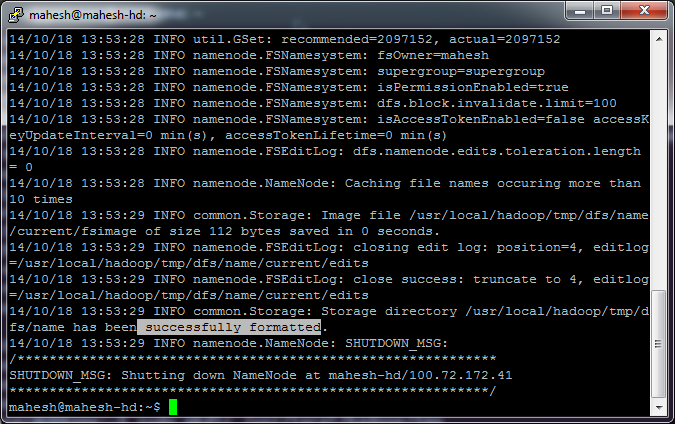
Start all services using:
start-all.sh

Install Hadoop on Oracle JDK
Download and install Oracle JDKsudo add-apt-repository ppa:webupd8team/java
sudo apt-get update
sudo apt-get install oracle-java7-installer
Change the hadoop-env.sh file java home directory according to the Oracle JDK path.
A Lion Called Christian
This was a story about a lion cub who was bought by two Australians (Ace and John) from Harrods department store. They called him Christian.


As the Christian grew bigger they arraigned Christian to be returned to the wild in Kenya.
Below images shows two unforgettable Christian's reunion with the Ace and John. The first reunion was made after almost 2 years after Christian was returned to the wild.
Second reunion.
Sunday, October 12, 2014
Achieving Rapid Response Times in Large Online Services - Google
When a query comes in there is a whole bunch of sub systems needs to be used in order to generate the information they needs on surface of the page. So they break these large systems down into bunch of sub services, and they need enough computation power on the back end so eventually when they get a query in and hit thousands of server and get all the results back and decide what they gonna show to the user in a pretty short amount of time.

In Google all of these servers run on shared environment, they do not allocate a particular machine for a specific task.

To handle this they take a little bit of a latency hit in order to keep the serving system safe. What they do they send the query to just a one leave and if that succeed then they have more confidence that query to gonna trouble sending to all thousand servers.

Source:https://www.youtube.com/watch?v=1-3Ahy7Fxsc
In Google all of these servers run on shared environment, they do not allocate a particular machine for a specific task.
Canary Requests
One of the ways to keeping your serving system safe in the presence of a large fanout system. normally when you take in a query on top of the tree and send it down to the parents eventually to all the leaves. What happens if all of the sudden the query passing code runs on leaves crash for some reason, due to a weird property of the query never seen before. so all of the sudden you send the query down and it will kill your data center.To handle this they take a little bit of a latency hit in order to keep the serving system safe. What they do they send the query to just a one leave and if that succeed then they have more confidence that query to gonna trouble sending to all thousand servers.
Backup Request
Request (req 9 ) is sent to particular server and if they do not heard back from that server, the send the same request to a another server.Source:https://www.youtube.com/watch?v=1-3Ahy7Fxsc
Subscribe to:
Posts (Atom)